
Suno - AI Music & Songs Maker review
 Analysis by GetAllApps
I came to Suno looking for a quicker way to turn a musical idea into something I could actually hear, rather than another tool for arranging notes one by one. Its appeal is immediate: describe a mood, subject, or style, and the app works toward a complete song. That makes it inviting even if you have never opened a music-production app, though it also means the results depend on how clearly you can describe what you want.
In my experience, the best way to think about it is as a creative sketchbook with a song generator inside. It can help me test an idea, find a direction for a playlist or personal project, or make something playful for a friend. I would not treat it as a guaranteed shortcut to a finished, release-ready track. The interesting part is how quickly it can make an idea feel tangible; the trade-off is that a generated song may not match the details I had in mind.
From a prompt to a song, without the studio routine
Suno is a music and audio app from Suno, Inc. The current version is 1.94.0, and the app is free to install. Its central experience is built around asking AI to make music, rather than recording and editing every instrument yourself. That distinction matters: it is designed for starting with a description, not for replacing a full digital audio workstation or a musician’s hands-on control.
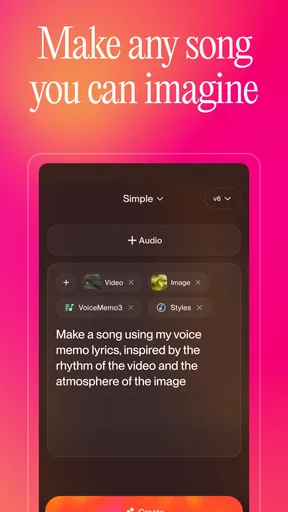
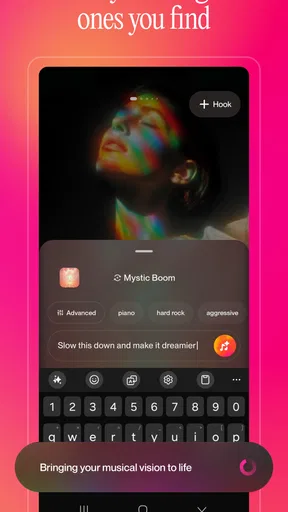
A useful prompt needs more than a broad label such as “happy pop.” I get a more directed starting point by naming the mood, the kind of voice or energy I imagine, and what the song should be about. For example, a prompt for a light, upbeat song about finally finishing a long week gives the generator a more distinctive brief than simply asking for something cheerful. I still expect to adjust my wording and try again; prompting is part of the creative process, not a one-time formality.
This approach is especially handy when I have a concept but no melody. I can explore whether an idea feels better as something intimate, dramatic, or playful before investing time in a more detailed production process. It is also a low-pressure way for a non-musician to experiment: I do not need to know chord names to begin. But people who already have a precise melody, arrangement, or vocal performance in mind may find the prompt-led approach too indirect.
How to get more useful results from a short brief
I recommend changing one part of a prompt at a time. If the first result has the right mood but the wrong lyrical focus, keep the mood and clarify the subject rather than replacing the entire description. That makes it easier to tell which instruction helped. A compact brief with a few meaningful details is often more workable than a long paragraph full of conflicting adjectives.
It also helps to separate the idea you want to hear from the use you have for it. A funny song for a small gathering can tolerate a surprise or two; a piece intended to sit behind a presentation needs to stay out of the way and fit the tone. Thinking about the listener before generating gives me a better standard for judging a result than asking only whether it sounds impressive on its own.
There is a creative trade-off here. Suno can help me get past the blank-page problem, but it makes choices for me along the way. I may like the broad direction while wishing the phrasing, vocal character, or musical shape were different. If control over each note and track is the main point of the project, a conventional editor is the better place to work.
When generation feels quick—and when the task feels heavier
The main speed advantage is the distance between an idea and an audible draft. Instead of building an arrangement from scratch, I can describe a direction and listen to what the system makes of it. That is valuable during brainstorming, when I want to compare possibilities more than polish a single version. I would not assume every request produces exactly the same kind of result or that every creative session will feel equally immediate.
Heavier use tends to come from iteration. A first attempt can reveal what is missing, and then I may want to revise the prompt, compare another direction, or keep exploring a particular mood. That can turn a simple test into a longer session, especially if I am trying to satisfy several constraints at once. My practical tip is to decide what matters most before generating: subject, mood, or style. If I keep changing all three, it becomes harder to judge progress.
Another realistic use is making a personal gift. I might draft a brief about an inside joke or a shared memory, then listen privately before deciding whether the result is suitable to share. This is more thoughtful than sending a generic track, but it still needs a human check: generated wording or tone may not land as intended. For a sensitive message, I would review the entire result rather than assuming the prompt has guaranteed the right nuance.
Reliability means judging each result, not trusting the prompt blindly
For a creative app, reliability is not only whether it opens; it is whether the output is useful enough to keep working with. I treat each generation as a proposal. A result can capture the broad feeling I wanted without following every detail, so I listen for fit rather than taking the prompt as a promise. If I need a particular lyric or a very specific musical arrangement, I would build in time for alternatives and manual work elsewhere.
I also find it sensible to keep a clear distinction between experimentation and final delivery. Suno is well suited to making rough concepts audible, but a draft that works for personal amusement may not be the right choice for a polished project. If consistency, exact timing, or fine-grained editing is essential, I would move to tools that expose more direct controls instead of expecting a prompt-based generator to behave like a traditional production workspace.
Recovery matters in any creative workflow because it is frustrating to lose a promising direction. My safest habit is to keep the wording of a prompt I like somewhere I can refer to, especially before making substantial changes. That gives me a way to return to the core idea if a later attempt wanders. I would also listen to a complete result before sharing it, rather than judging it from the initial impression alone.
Device fit, cost, and who should choose another tool
The app is listed for devices running Android 8.0 or later, so an older device below that requirement is not a fit. I would also be cautious about demanding creative sessions on a phone with limited free space or a weak connection, as AI music generation is not the same as simply playing a locally stored audio file. That is a practical expectation, not a promise about how quickly a particular device will respond. For longer listening or careful comparison, headphones and a quiet moment are more useful than a small speaker in a noisy room.
Suno has a Teen content rating. It is rated 4.8 on average, with around 2.6 million ratings, and has over 10 million installs. Those figures suggest that it has reached a large audience, but they do not tell me whether a particular generated song will suit my taste. I would try it for the creative workflow itself, not because popularity guarantees a perfect result.
The app is free to download, with in-app purchases ranging from $2.99 to $699.99 per item. I would start by seeing whether the free experience fits my habits before considering any purchase. The range is broad, so it is worth checking the current purchase details in the app store and deciding what I actually need rather than treating an upgrade as necessary for casual experimentation.
Compared with a conventional music editor, Suno lowers the barrier to getting a complete-sounding idea from a written brief, while giving me less direct control over the underlying musical decisions. Compared with a simple playlist or audio player, it is for making something new rather than choosing from finished tracks. If I want to learn production techniques or edit individual parts precisely, I would choose an editor. If I want a fast creative spark without needing instrumental skills, Suno is the more approachable starting point.
My performance verdict: a strong idea-starter, not a precision studio
After using it as a prompt-led creative tool, I see Suno’s strongest case in moments when I want to hear a concept rather than spend an afternoon constructing it. It suits curious listeners, people who write lyrics or stories, and anyone who enjoys exploring musical directions without first learning a production workflow. The key is to be patient enough to refine a brief and discerning enough to reject results that do not serve the purpose.
I would skip it if I needed exact control over every arrangement choice, dependable reproduction of a specific musical idea, or a traditional recording and mixing environment. It is also not my first choice when a project demands a carefully edited final track and there is no time to review or revise the output. Those needs are better met by music software built around hands-on production.
For casual creative work, though, the core experience is appealing: I can begin with a thought and quickly explore what it might sound like. The most useful habit is to treat generations as drafts, keep successful prompt wording, and evaluate the result against its intended use. With that mindset, Suno is an enjoyable way to get unstuck and make musical experiments feel accessible, while its limits remain clear enough that I know when to reach for a more precise tool.
Pros and cons
Pros
- Creates complete songs from short text prompts.
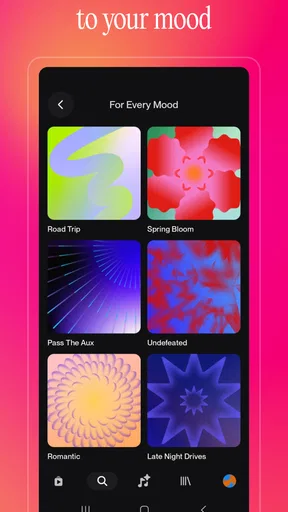
- Offers multiple musical styles and vocal options.
- Makes it easy to share finished tracks.
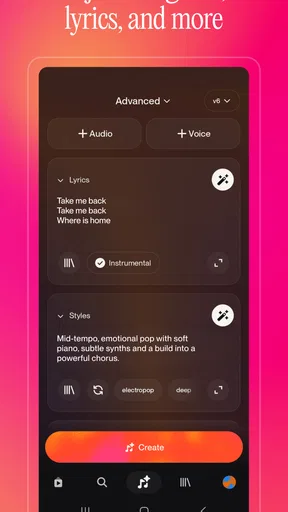
- Custom lyrics can guide the song's message.
- Song creation is accessible without music production skills.
Cons
- Free usage is limited by daily credits.
- Generated lyrics may include awkward phrasing.
- Results can vary in quality between attempts.
- Tracks may not match the prompt precisely.
- Commercial use may require a paid plan.


